Log Consumption Interface Documentation
Overview
The Log Consumption page allows users to manually review, filter, and update electricity usage data for individual customers across different projects and countries.
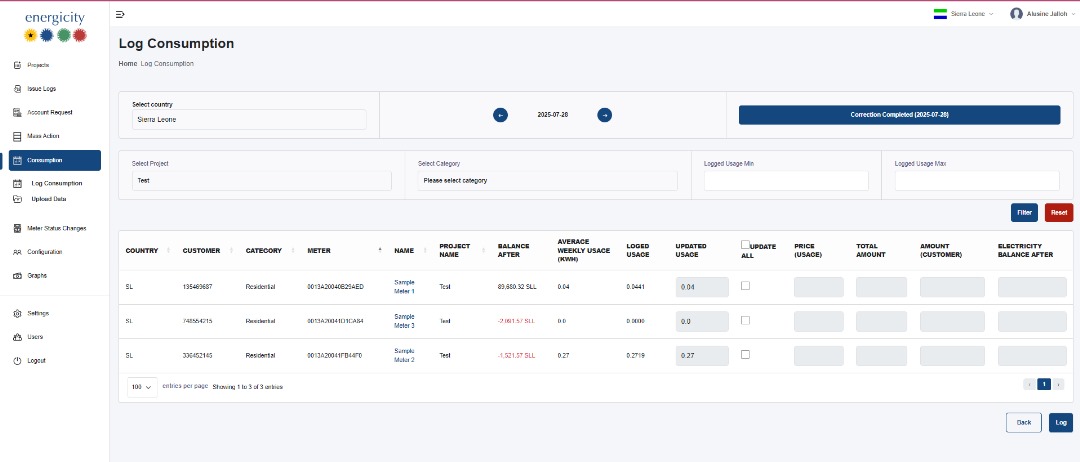
Key Features
1. Filter Section
- Country: Dynamic dropdown to filter data by country.
- Project and Category: Static dropdowns for project and customer category selection.
- Date Range: Allows filtering by specific dates.
- Logged Usage Min/Max: Numeric fields to filter customers based on their logged usage.
- Filter Button: Applies the selected filters.
- Reset Button: Clears all filters.
2. Consumption Data Table
Displays detailed information per customer: - Country, Customer, Category, Meter, Name, Project Name - Balance After: The remaining balance after the usage is applied. - Average Weekly Usage (kWh): Historical average consumption. - Logged Usage: Previous or currently recorded usage. - Updated Usage: Field to update the usage value. - Checkbox: Allows manual confirmation to update usage per customer.
3. Auto-calculated Fields
Based on updated or logged usage: - Price (Usage): Cost for the consumption. - Total Amount: Total calculated amount. - Amount (Customer): Amount attributed to the customer. - Electricity Balance After: New balance post logging.
4. Additional Functionalities
- Update All Checkbox: Selects all rows for update.
- Log Button: Finalizes and submits all usage data entries.
- Back Button: Navigates away from the page without changes.
Notes
- Only authorized users can make changes.
- Fields like pricing and balances are auto-calculated and cannot be edited manually.