Account Request – Interface Documentation
Overview
The Account Request section in the Energicity platform is designed for internal staff to manage and track customer account activation or deactivation processes. It provides a detailed tabular view of each request, including customer data, meter changes, financial status, and the request lifecycle. All actions on this page are restricted to authorized staff members.
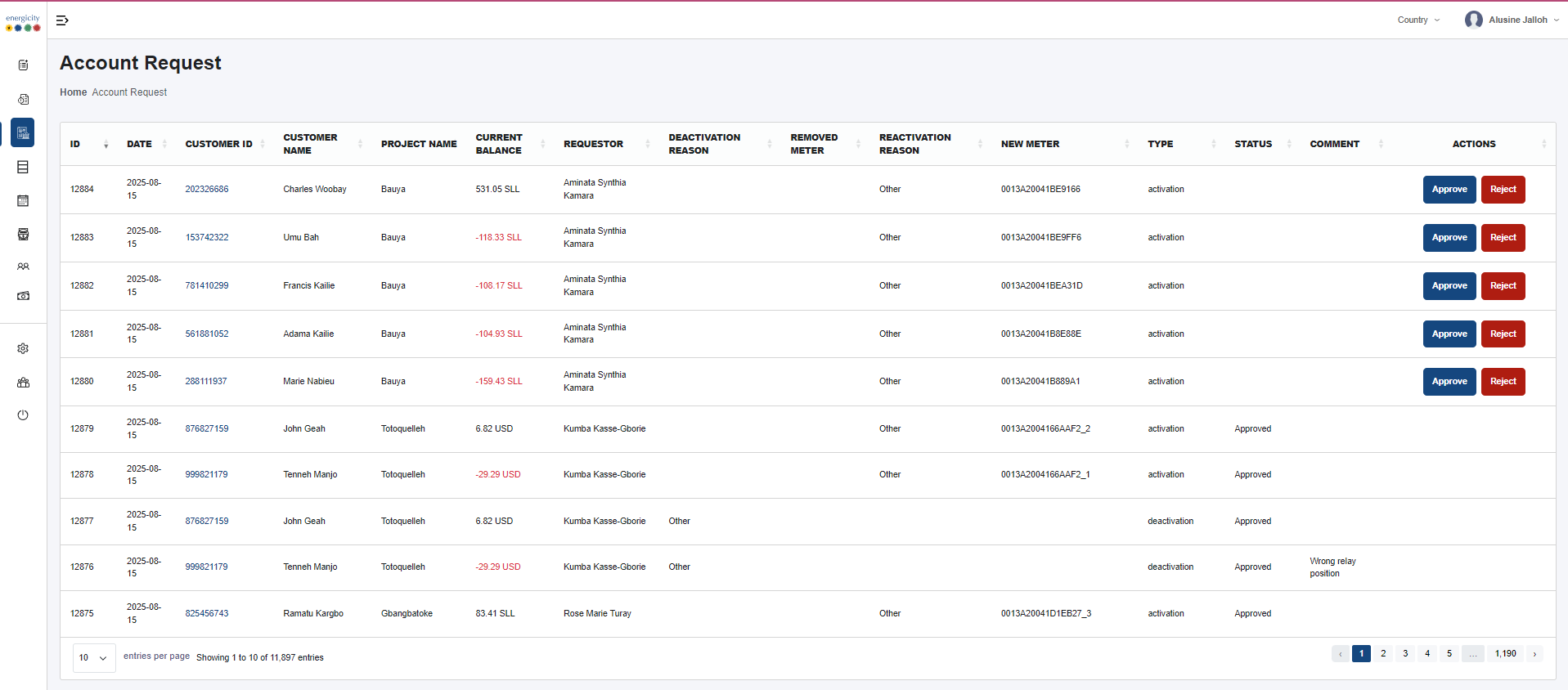
Interface Components
1. Sidebar Navigation - Projects - Issue Logs - Account Request (highlighted as the active section) - Mass Action - Consumption - Meter Status Changes - Configuration - Graphs - Settings - Users - Logout
2. Top Header - Title: “Account Request” - Breadcrumbs: Home > Account Request - Country Selector (top-right): Filters data by project country - User Info (top-right): Shows the logged-in user profile
Data Table Structure
The main feature of the page is a comprehensive table displaying each account request with the following columns:
| Column | Description |
|---|---|
| Date | Date the request was submitted |
| Customer ID | Unique identifier of the customer |
| Customer Name | Full name of the customer |
| Project Name | Name of the project/community the customer belongs to |
| Current Balance | The customer's available balance at the time of the request (displayed in local currency, e.g., CFA or USD) |
| Requestor | Name of the staff who submitted the request |
| Deactivation Reason | Reason the customer account was deactivated (if applicable) |
| Removed Meter | Meter ID that was decommissioned or replaced |
| Reactivation Reason | Explanation for reactivating the account |
| New Meter | New meter ID assigned to the customer |
| Type | Indicates request type: activation or deactivation |
| Status | Displays the current status (e.g., Approved). This is read-only. |
| Comment | Manual note added by the staff with relevant details |
| Actions | Set of operations that staff can perform (see below) |
Actions Available
From the Actions column, authorized users can: - View the request in detail - Edit the existing request (e.g., update meter info, reasons) - Approve the request - Reject the request
Table Features
- Sorting: Users can sort data by clicking on column headers (e.g., Date, Project Name).
- Pagination: Controls are available at the bottom to navigate through large volumes of data.
- Entries Display Selector: Allows users to change how many records are shown per page (e.g., 10, 25, 50).
- No Filter/Search Bar: This table does not support direct text search or filtering.
Access Control
- Only authorized staff members can view and manage this section.
- Customers cannot submit account requests directly.
Use Cases
- Track and validate meter activations/deactivations
- Audit current and historical financial balance at request time
- Review comments and justification for each request
- Ensure proper approval/rejection flow for customer account changes