Energicity Platform – Projects Page UI Documentation
Overview
The Projects interface provides a centralized view and management panel for all energy projects managed within the Energicity platform. It displays real-time data about each project’s location, customer count, revenue, and consumption statuses.
Interface Layout
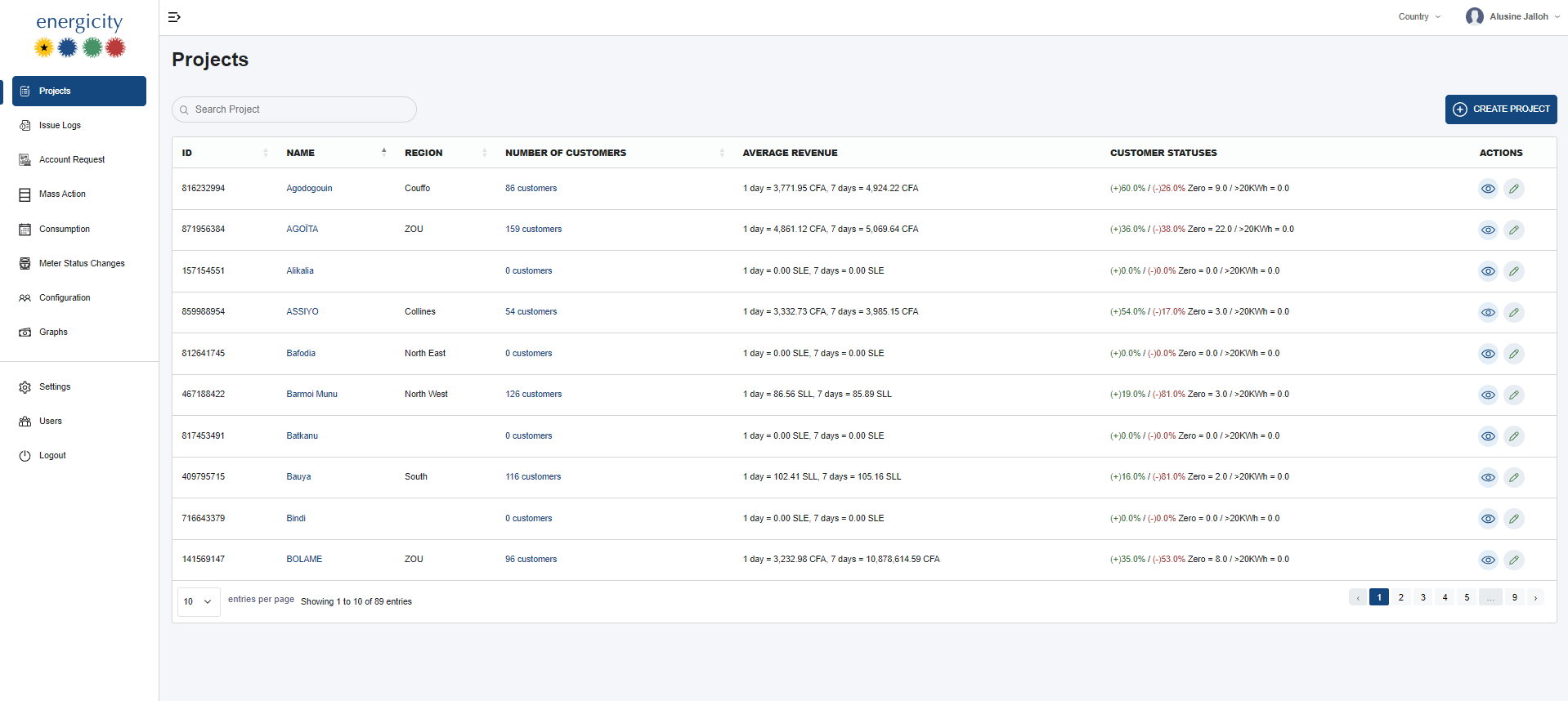
Sidebar Navigation (Left)
Provides access to the following modules:
- Projects (Current Page)
- Issue Logs
- Account Request
- Mass Action
- Consumption
- Meter Status Changes
- Configuration
- Graphs
- Settings
- Users
- Logout
Top Navigation Bar
- Country Dropdown: Filters displayed projects based on selected country.
- User Profile: Displays the logged-in user (e.g., Alucine Jalloh).
- Hamburger Icon: Toggles the sidebar.
Projects Table
Columns
- ID: System-generated unique identifier for the project.
- Name: Names of the project.
- Region: Regional location of the project.
- Number of Customers: Shows how many customers are attached to the project.
- Average Revenue: Revenue stats over time:
- 1 day for daily stat and 7 days for weekly aggregate - Displayed in localized currency - Customer Statuses: Real-time breakdown:
- Format:(+Active%) / (Inactive%) Zero = count / 20KWH = valuethis gives user a glimpse of percententage of active customers and inactive users and with kwh usages from 0 to over 20kwh - Actions:
- 👁️ View: Open full project details
- ✏️ Edit: Modify project metadata
- No delete action present
Features & Interactions
Search Project
Allows keyword search by project name.
Create Project
Located at the top-right of the table. Opens a form/modal to input a new project's information.
Pagination
- Default: 10 entries per page
- Navigation at the bottom for jumping between pages
Sorting
Only a few columns support sorting. Non-sortable columns have inactive or hidden sort icons.
Real-Time Aggregation Behavior
Customer statuses update post-billing (after 12 noon) and on customer top-ups.
Country Filter
The Country dropdown on the top-right filters all project data by country.
Essential for multi-country deployments and role-based access.
Notes for Developers / Testers
- Revenue and customer status values must handle currency formatting based on project locale.
- The system should gracefully handle projects with 0 customers or 0 revenue.
- Role-based access control may restrict "Edit" or "Create" actions based on user role.