Customer Details - Account Details Tab
Overview
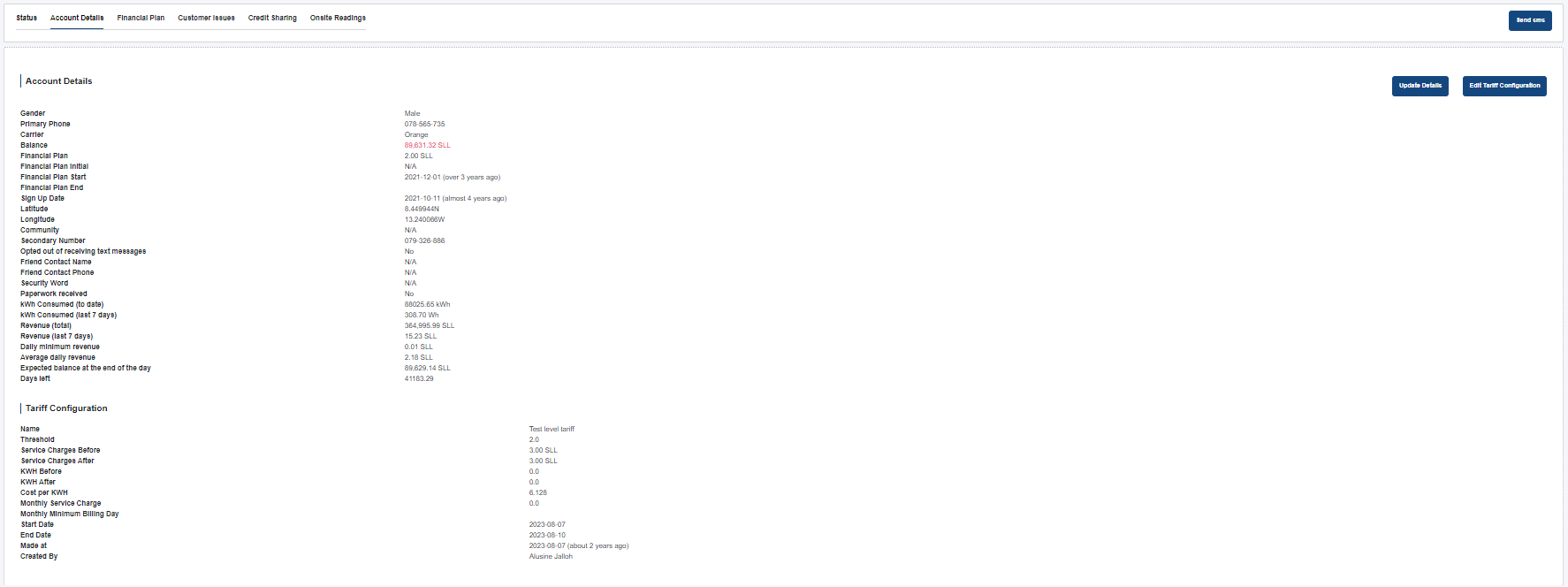
The Account Details tab under the Customer Details page provides a comprehensive view of the customer's account information, usage data, and tariff configuration. This page is restricted to certain user levels for editing and sending SMS, but can be viewed by other authorized users.
Interface Components
1. Screenshot Placement
The screenshot above shows the complete layout of the Account Details tab.
2. Account Details Section
- Displays personal and contact information such as gender, phone numbers, carrier, sign-up date, latitude, and longitude.
- Financial and usage data including balance, financial plan details, kWh consumed, and revenue statistics.
- Historical usage metrics like kWh consumed in the last 7 days, revenue over specific periods, and days left on the account.
3. Tariff Configuration Section
- Shows the current tariff plan assigned to the customer.
- Details include name, thresholds, service charges, kWh pricing, billing cycles, and plan creation metadata.
4. Actions
- Send SMS: Allows authorized users to send a custom SMS to the customer.
- Update Details: Opens a form to modify customer details.
- Edit Tariff Configuration: Opens a form to adjust the assigned tariff.
Data Behavior
- Real-time Updates: All account and tariff data is updated live from the backend.
- Auto-generated Values: Many financial and usage metrics are system-calculated from customer activity.
- Restricted Actions: Only certain roles (e.g., admin, supervisors) can modify data or send SMS.