Financial Plans
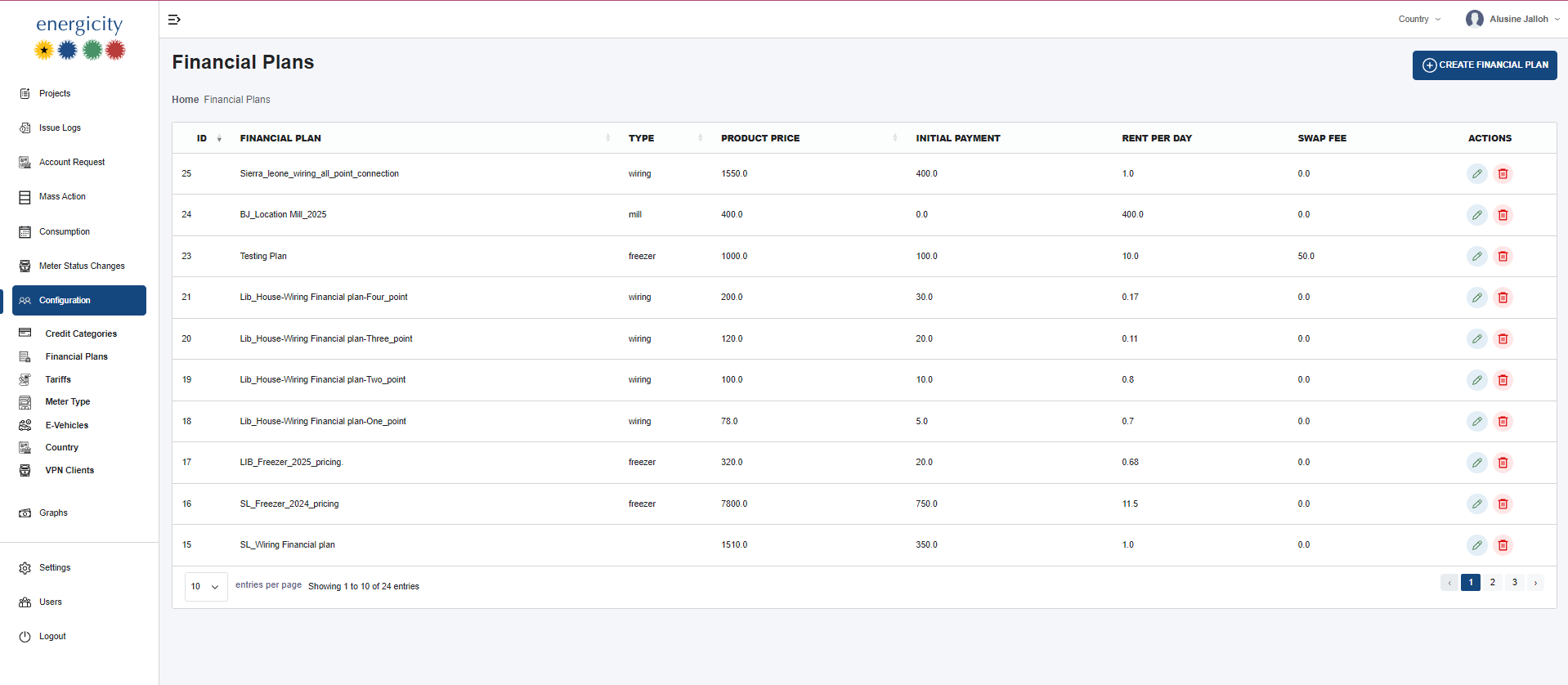
The Financial Plans section, found under the Configuration tab, allows administrators to define and manage financial models tied to product offerings such as wiring, e-bikes, fans, and more.
🔧 Interface Description
| Field | Description |
|---|---|
| ID | Auto-generated identifier of each financial plan entry. |
| Financial Plan | Name of the financial plan (e.g., SL_Freezer_2024_pricing). |
| Type | Type of product the plan is created for (e.g., wiring, freezer, e-bike). |
| Product Price | Total cost of the product/service. |
| Initial Payment | The amount to be paid upfront. |
| Rent Per Day | Daily cost that will be charged for the product. |
| Swap Fee | Applicable fee for services like battery swaps (mainly for e-bikes). |
| Actions | Includes: edit (✏️) and delete (🗑️) — only accessible to admin users. |
➕ Create Financial Plan
Clicking the "Create Financial Plan" button opens a form for entering the following mandatory fields:
- Financial Plan Name
- Type (e.g., wiring, freezer, e-bike)
- Product Price
- Initial Payment
- Rent Per Day
- Swap Fee
There are no client-side validation rules, but all fields must be filled before submission.
⚙️ Functional Notes
- Types help determine the category and use-case of the financial plan (e.g., freezer rental, e-bike services).
- Swap fees are typically used for handling battery replacement/recharging logistics in e-bikes.
- The Delete action will prompt a confirmation dialog to ensure no accidental deletions.
- Admins can edit or delete financial plans from the list.