Country Configuration Interface Documentation
Overview
The Country Configuration interface allows administrators to manage country-specific settings used throughout the system. Each entry represents a country with associated identifiers and attributes relevant for operational purposes such as currency, code, and activity status.
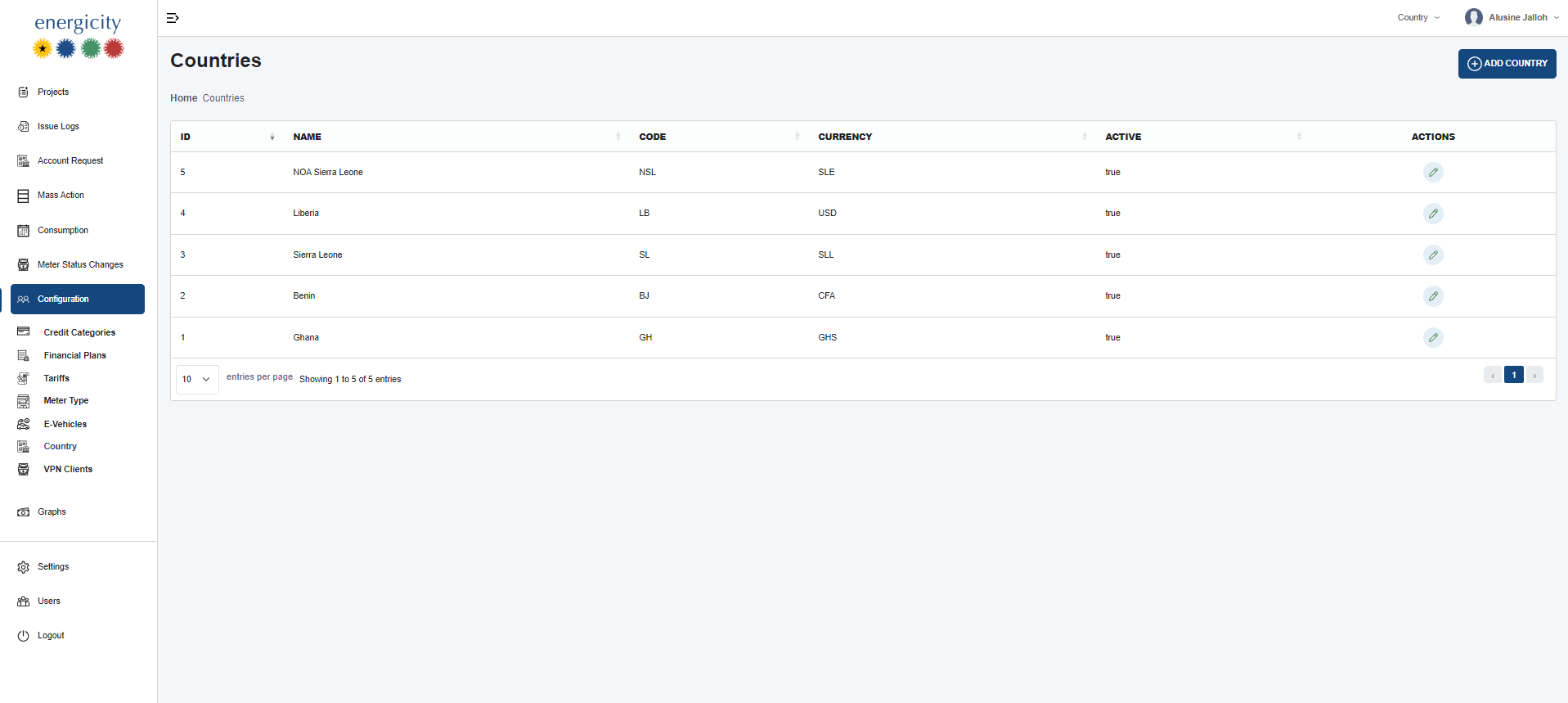
Interface Features
- Add Country Button: Opens a form to add a new country configuration. All fields are required for a valid submission.
Table Columns
Column Description
ID Auto-generated unique identifier for each country configuration.
Name The full name of the country.
Code A short 2-3 letter code representing the country (e.g., SL for Sierra Leone).
Currency The currency used in the respective country (e.g., SLL, CFA, USD).
Active Boolean status indicating if the country is currently active (true/false).
Actions Edit icon to update the configuration. Only edit is allowed (no delete).
Functional Rules
- Creating Country: Triggered by the "Add Country" button, opens a form where all inputs (name, code, currency, active) are required.
- Unique Code: Each country must have a unique country code.
- Currency Assignment: The selected currency defines monetary transactions in reports and tariff configurations.
- Activity Status: Determines if the country should appear in filters or operational logic.
- Edit Access: Only admins can update existing records using the edit icon.
Usage Scenario
This configuration is particularly useful in a multi-national system setup where different projects or customers may belong to different countries, each with their own currency and code system.